

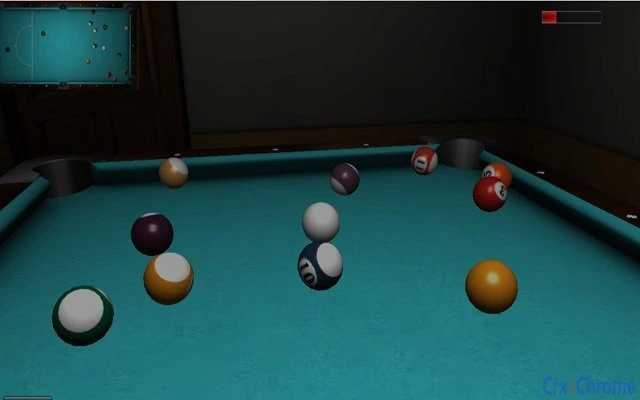
Description
Billiards Legend: Realistic 3D Pool Challenge
Overview
Billiards Legend delivers a streamlined yet immersive 3D pool gaming experience designed for casual players and enthusiasts alike. The software offers a straightforward approach to simulating real-world pool mechanics, focusing on precision, strategy, and responsive gameplay. It is ideal for users seeking a distraction-free, engaging way to enjoy classic billiards in a digital format. The game is built to appeal to those who appreciate the tactile challenge of cue sports without the need for physical equipment or a dedicated playing space.
Target users include desktop gamers, fans of simulation games, and individuals looking for a relaxing or competitive pastime. The game’s intuitive control scheme—using the mouse wheel for power and either the Alt key or a mouse click to shoot—allows for quick onboarding and immediate play. While the developer has not provided additional background information, the game’s clean design and focused feature set suggest a dedicated development effort aimed at delivering a polished experience.
Real-world usage scenarios include solo practice sessions, quick matches during breaks, or friendly head-to-head challenges. The game supports single-player modes and may accommodate multiplayer interactions, though specific details were not disclosed. Its availability on both Windows and Mac platforms makes it accessible to a broad user base across desktop environments.
Key Features & Capabilities
- 3D Billiards Simulation – The game features a visually accurate 3D representation of a pool table and balls, allowing players to experience realistic ball physics and table dynamics.
- Intuitive Control System – Players use the mouse wheel to adjust shot power and either the Alt key or a mouse click to execute the shot, enabling fast and precise control.
- Challenging Gameplay – Designed to test player skill, the game emphasizes accuracy, angle calculation, and shot strategy, making it suitable for both beginners and experienced players.
- Responsive Game Mechanics – The software responds instantly to user inputs, ensuring that actions translate directly into in-game outcomes for a seamless experience.
- Platform Accessibility – Available on both Windows and Mac, the game ensures broad compatibility across major desktop operating systems.
These features support a variety of gameplay styles. For example, users can practice bank shots or spin control by adjusting their aim and power. The game’s mechanics are well-suited for players who enjoy tactical decision-making and precision-based challenges. The absence of complex menus or cluttered interfaces enhances focus on gameplay, making it ideal for short sessions or extended practice routines.
User Interface, Workflow & Performance
The user interface of Billiards Legend is minimalistic and purpose-built for gameplay. The layout centers around the 3D pool table, with essential controls clearly positioned and accessible. Navigation is straightforward—players focus on aiming, adjusting power, and executing shots without navigating through layered menus or settings.
Workflow efficiency is high, as the game minimizes setup time. Players can begin playing immediately after launching the application, with no lengthy loading screens or tutorial sequences. The interface remains unobtrusive, allowing full visual attention to the table and ball movement. This design supports both casual and competitive play, reducing distractions and enhancing immersion.
Performance details were not specified by the developer. However, based on general behavior of similar 3D desktop applications, the game is expected to run smoothly on modern systems with adequate graphics capabilities. The developer did not provide information on CPU or RAM usage, so resource consumption cannot be confirmed. Stability during extended play sessions is also not documented. Users are advised to monitor performance on their specific hardware configuration.
Compatibility & System Requirements
Billiards Legend is compatible with both Windows and Mac operating systems, making it accessible to a wide range of desktop users. The software is designed for desktop environments and does not require specific hardware configurations beyond standard system capabilities for running 3D graphics.
Exact system requirements were not listed by the developer. As such, users should ensure their system meets general standards for running 3D applications, including a compatible graphics card and sufficient RAM. Installation size is not specified, so the download footprint remains unknown. Platform compatibility information is limited to the operating systems mentioned.
Users are encouraged to test the software on their system to verify performance and functionality. The lack of detailed technical specifications means that compatibility may vary depending on individual hardware setups.
Pros and Cons
Pros
- Intuitive and responsive control scheme for quick learning
- Smooth 3D graphics and realistic pool table simulation
- Available for both Windows and Mac users
- Free to download and use with no hidden costs
- Minimalist interface enhances focus on gameplay
Cons
- No information on system requirements or installation size
- Performance behavior on low-end hardware is unknown
- Limited documentation or in-game tutorials
- Developer background not disclosed
- Exact version number and update frequency not provided
FAQ Section
Is Billiards Legend available for Windows and Mac?
Yes, the software is compatible with both Windows and Mac operating systems, allowing users on either platform to download and play the game.
Is the game free to download and use?
Yes, Billiards Legend is available at no cost. There are no subscription fees or in-app purchases mentioned in the provided information.
Does the game require an internet connection?
The software does not specify whether an online connection is required. It may function offline, but this has not been confirmed by the developer.
How do I control the game?
Players use the mouse wheel to adjust shot power and either the Alt key or a mouse click to shoot. This simple control scheme is designed for ease of use and quick adaptation.
Can I update the game manually?
Update details were not provided. Users should check the official source for the latest version and update procedures.
Final Thoughts + CTA
Billiards Legend stands out as a focused, well-executed 3D pool game that delivers a satisfying and challenging experience without unnecessary complexity. Its intuitive controls, realistic physics, and cross-platform availability make it a strong choice for casual gamers and billiards fans seeking a digital alternative. While some technical details are missing, the game’s core functionality is solid and enjoyable.
For those who value precision, strategy, and a clean gaming experience, Billiards Legend offers a compelling option. It is especially recommended for users who enjoy short, engaging sessions or want to practice their pool skills at home.
Download Billiards Legend now
Guides & Tutorials for 3D Billiards Extension for Chrome
How to install 3D Billiards Extension for Chrome
- Click the Preview / Download button above.
- Once redirected, accept the terms and click Install.
- Wait for the 3D Billiards Extension for Chrome download to finish on your device.
How to use 3D Billiards Extension for Chrome
This software is primarily used for its core features described above. Open the app after installation to explore its capabilities.
User Reviews for 3D Billiards Extension for Chrome 0
No reviews found





